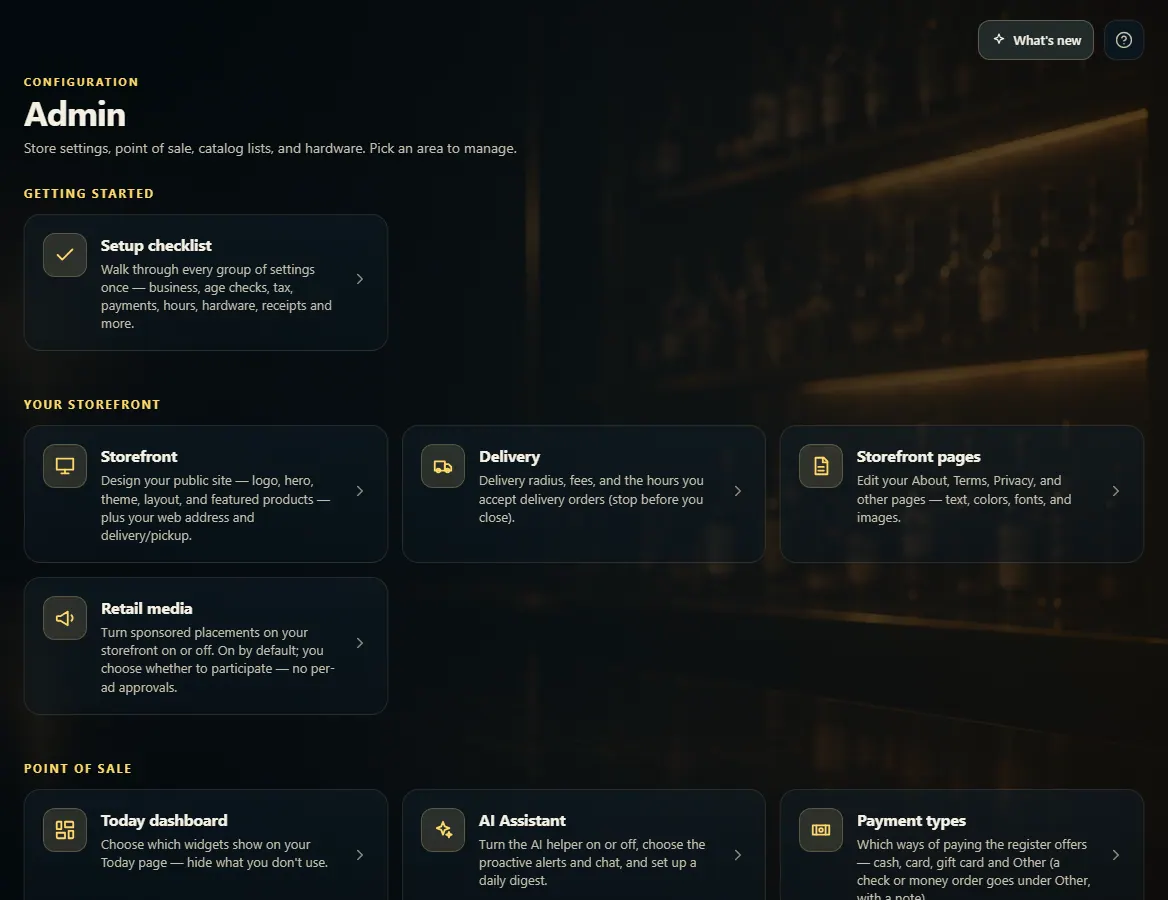
Admin is the menu of every store setting, grouped by what it controls — pick a tile to open that setting's page.
A step-by-step walkthrough with real screenshots · FoolProof POS for alcohol retail
Steps
Open Admin from the menu (under Settings).
Find the group for what you want to change: Getting started, Your storefront, Point of sale, Catalog & inventory, Business & locations, or Hardware & printing.
Click the tile to open its page. Make your change and click that page's Save button before you leave.
Click Admin at the top left of any settings page to go back to the list.
Good to know
New store? Start with Setup checklist — it walks through every group once.
A setting marked Managed by FoolProof was set for your store by FoolProof (for example card surcharging, which your payment processor must approve). It can't be changed here; the note says why. Contact FoolProof to change it.
You only see the tiles your role allows. AI Assistant and Export your data have their own permissions.
If you own more than one store, an All stores tile under Business & locations sets the key options for every store at once.
1. Settings grouped by what they control
Each group holds the tiles for one part of the store. Click a tile to open its page.
123
1New store? Start here.
2Your public website.
3The register: payments, receipts, reasons, the sale screen.
 123
123