Selling at the register
 123
123
Choose how New Sale works
Admin → New Sale sets the cash drawer rules, default tender, ID checks, payment layout, Register mode, quotes, layaway, customer lookup, category chips and loyalty sign-up.
Steps
- Open Admin and choose New Sale.
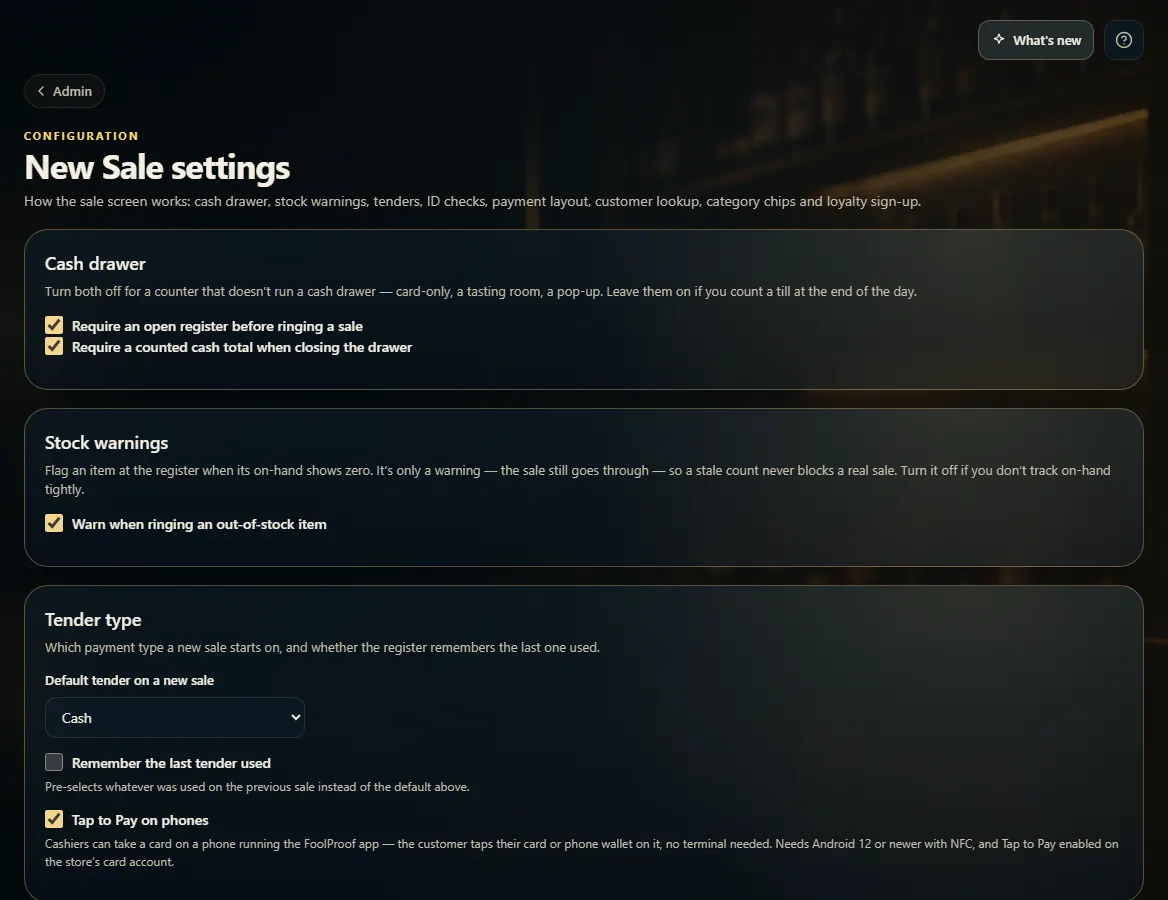
- Cash drawer: whether a sale needs an open register, and whether closing needs a counted cash total.
- Tender type: the payment a new sale starts on, and whether to remember the last one used.
- Turn on ID scan age check, Register mode, Quotes or Layaway if you use them.
- Payment layout: a Pay screen, or One screen with payment under the cart.
- Most switches save as soon as you change them; Category quick-picks and Loyalty have their own Save buttons.
Good to know
- With "Require an open register" off, card sales ring with no drawer open; refunds, voids, pay-ins and payouts still need one.
- A setting with a lock note is managed by FoolProof for your store.
1. The drawer and tender settings
These save the moment you change them.
123- 1Need an open drawer to sell.
- 2Need a cash count to close.
- 3Default tender and Tap to Pay.